
The AI workforce for your business
BinTouchEnterprise AI Workforce
Build Your AI Organization Inside Your Business.
BinTouch brings a tailored AI workforce into your existing organization — virtual employees, coordinated teams, and AI managers designed around your business, your systems, and the way you work.
Not another standalone AI tool. An AI workforce built to become part of your operation.
- AI Employees & Teams
- Tailored to Your Organization
- Connected to Your Systems
- Managed with Human Oversight

How it works
From Your Business to an AI-Powered Organization.
We don't ask your business to fit a prebuilt AI product. We study how your organization operates, then design a workforce that fits your people, processes, systems, and goals.
01 Discover & Map
We learn how your business operates — its departments, roles, workflows, systems, challenges, and opportunities.
02 Design Your AI Organization
We define the roles, responsibilities, reporting structure, tools, and approval boundaries of your AI workforce.
03 Build & Integrate
We engineer your AI employees and connect them to the relevant business systems, communication channels, and operational processes.
04 Launch, Monitor & Improve
We introduce the workforce into your operation, monitor performance, address exceptions, and improve workflows and responsibilities over time.
See the work
See the Work. Not Just the AI.
The value of an AI employee isn't in the conversation alone. It's in the work completed afterward — checking records, validating information, updating systems, coordinating people, and moving requests toward resolution.
From Service Request to Resolution
A customer submits a service request. An AI employee reviews the information, checks the customer's records and warranty status, validates supporting documents, creates a structured service case, and coordinates the next steps.
The example illustrates how multiple steps across different systems can become one coordinated business process, with human review wherever required.
Illustrative demo
Northwind SuppliesSR-10492
Built around your business
Your Departments. Your AI Workforce.
From individual roles to entire departments, BinTouch is designed around the work your organization needs to get done.
Illustrative demo
Sales
Sales work starts before the conversation. An AI employee can read a new lead, check what the organization already knows, and prepare a follow-up a person can send or change.
- Read the new lead
- Check the existing record
- Draft the follow-up
- Leave the next step for a person
Illustrative example of a sales role. The real handoff is designed for your process.
Customer Service
Customer service here is more than a reply. An AI employee can take the inquiry, find the record, open a case, and bring a person in when the answer needs a judgment.
- Take the inquiry
- Find the customer record
- Open the service case
- Bring in a person when needed
Illustrative example. It is not a claim that every inquiry is resolved without a person.
Operations
Operations work is the recurring path: what is due, who has it, and what stopped. An AI employee can track that path and surface the exception instead of hiding it.
- Track the open task
- See who has the next step
- Flag the exception
- Keep the status current
Illustrative example of an operations role, not a measured workload.
Marketing & Growth
The marketing role here is operational. It moves an approved piece forward, keeps the campaign step in order, and prepares a report a person can read.
- Move the approved piece forward
- Keep the campaign step in order
- Prepare the report
- Hold unpublished work for review
Illustrative example. It does not promise reach, rankings, or a result.
Administration
Administration is the steady handling of documents, files, and calendars. An AI employee can prepare that work and leave the decision, or the send, with a person.
- Prepare the document
- File it where the team expects
- Propose the time
- Wait for a person to confirm
Illustrative example of routine administration, not a full back office.
IT & Systems
IT support in this design follows a defined path. An AI employee can record the check, update the note, and stop when the request is outside the authorized steps.
- Follow the defined support path
- Record the check
- Update the note
- Stop outside the authorized path
Illustrative example. Access stays inside the permissions you set.
Finance & Procurement
Finance and procurement stay approval-controlled. An AI employee can prepare the match, line up the vendor step, and hold anything that needs a person before it continues.
- Prepare the match
- Line up the vendor step
- Hold the item for approval
- Record what was decided
Illustrative example. Nothing here is a payment promise or a published saving.
People Operations
People operations here means the approved administrative path: onboarding steps, the form that was cleared, and the internal note a colleague is allowed to see.
- Walk the approved onboarding steps
- Open the cleared form
- Find the internal note
- Hand the exception to a person
Illustrative example. Sensitive employment decisions stay with people.
These are examples of what can be designed. Every BinTouch workforce is tailored to the organization's actual requirements.
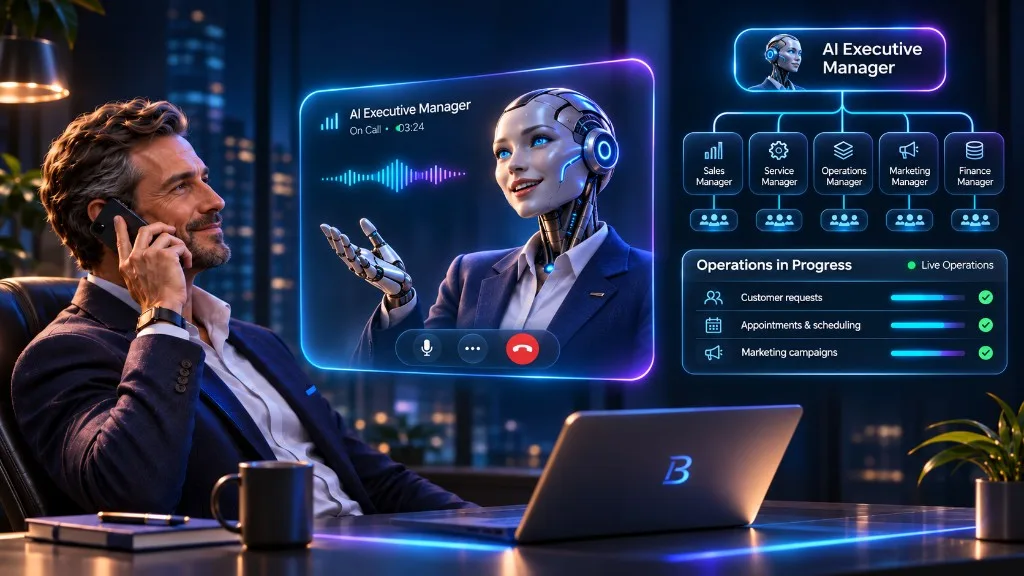
One conversation. An entire AI workforce.
One Conversation. An Entire AI Workforce.
You shouldn't have to manage every AI employee individually. BinTouch can organize your AI workforce into teams and departments, with a central AI manager coordinating the work and keeping your people informed.
One Point of Contact
Communicate with a central AI manager instead of chasing updates from multiple agents.
Coordinated Departments
Department managers organize tasks, supervise team workflows, and report progress.
Human Decisions Where They Matter
Escalations and approvals reach the right human decision-maker according to your organization's policies.
Visibility Without Micromanagement
Follow progress, review exceptions, and understand what your AI organization is doing.
The tree is an illustration. The waveform is not a live call.
Works with what you already have
Your Existing Systems Stay at the Center.
BinTouch is designed to work with the tools, data, and workflows your business already relies on — bringing AI employees into your existing operation instead of forcing you into an entirely new one.
CRM
Customer records, leads, opportunities, service histories, and updates.
ERP
Business records, orders, inventory, financial workflows, and operational data.
Email & Messaging
Incoming inquiries, follow-ups, internal communication, and customer correspondence.
Calendar & Scheduling
Appointments, availability, reminders, and coordination.
Voice & Telephony
Incoming and outgoing calls, call handling, routing, and connected follow-up workflows.
Documents & Knowledge
Business documents, internal procedures, approved knowledge, and information retrieval.
APIs & Custom Systems
Connections to supported business software and purpose-built internal applications.
- 01Inquiry received
- 02Record checked
- 03Status returned
Each integration is designed around the systems, access rights, and technical requirements of the specific organization.
Your rules. Your control.
Your Rules. Your Approvals. Your Pace.
Your AI workforce operates within the responsibilities, access permissions, and approval policies you define. Start with tighter supervision and expand autonomy as the system demonstrates reliable performance.
Role-Based Permissions
Define what each AI employee can access and which actions it is authorized to perform.
Human Approval Gates
Require human approval for selected actions, decisions, or exceptions.
Operational Visibility
Track tasks, outcomes, escalations, and the activity of your digital workforce.
Progressive Autonomy
Review performance and adjust permissions as your organization gains confidence.
Exception Handling
Route uncertain, sensitive, or failed tasks to the appropriate person or review process.
Illustrative demo
Schedule the visit
Needs approval
Built for continuous operations
The Workforce That Doesn't Clock Out.
Your business doesn't stop when the office closes. With the right infrastructure and controls, BinTouch can keep defined workflows moving beyond normal business hours — responding to requests, processing information, and coordinating tasks across multiple channels. The same design is what changes the cost of that work: repetitive steps no longer need a person on each one, and the people you do have can supervise a wider operation.
Beyond Business Hours
Maintain configured digital workflows during nights, weekends, and holidays. A 24/7 configuration is available when the infrastructure, the connected systems, and the operating setup support it. This is not a promise of uninterrupted uptime.
No Personal Leave
A digital employee does not take vacation or sick leave. Coverage still depends on the service, the integrations, and monitoring. It is not a claim that the service itself never stops.
Parallel Work Capacity
Handle multiple requests and workflows at the same time, based on the systems and resources allocated. One digital worker is not limited to one task at a time.
Less Manual Load
Reduce the operational load that comes from doing the same steps by hand, and reduce the bottlenecks that come from one person’s availability.
Scale Around Demand
Increase or adjust digital processing capacity according to business needs and technical constraints.
Fewer Roles on the Manual Path
For a defined process, the number of human roles required to perform the repetitive steps can be reduced. The human work that remains is supervision, approval, exceptions, and the decisions that need a person.
A Real Opportunity to Lower Cost
That shift can produce a meaningful saving in labor and operating cost for the work that moves. The saving is the difference between today’s manual cost and the configured digital operation, including implementation and running cost. No figure is published here because no customer result has been measured and cleared for publication.
Continuous operation and any cost reduction depend on configuration, connected systems, monitoring, and service availability. BinTouch does not publish a percentage, an SLA, a headcount, or an ROI.
- Each request waits for a person
- The digital team processes the queue, including outside office hours
- People supervise, approve, and handle exceptions
How the cost of a defined process can change. Illustrative mechanism, not a measured result.
Measure what matters
Make Better Work Visible and Measurable.
A digital workforce should be judged by the work it completes and the business outcomes it supports — not by the number of AI agents deployed.
Illustrative demo
12 requests in this view
Work Completed
Track completed requests, processed tasks, and operational throughput.
Time to Resolution
Understand how long important workflows take from request to completion.
Human Escalations
See which tasks need attention, approval, or further review.
Service Quality
Evaluate outcomes, exceptions, and opportunities to improve customer experience.
Operational Cost
Compare the resources needed to complete defined workflows before and after implementation. This is where a saving becomes visible, after the work is measured. It is not a number this page already knows.
Capacity & Growth
Observe how workload and performance change as digital capacity expands.
Better visibility helps your organization improve its processes, allocate people more effectively, and make informed decisions about where to expand its AI workforce.
Questions & clarity
Frequently Asked Questions.
Understand how BinTouch is designed, integrated, managed, and adapted to your business.
Frequently Asked Questions.
What is BinTouch?
BinTouch is a custom AI workforce solution that brings virtual employees, AI-managed teams, and coordinated digital workflows into an existing organization. Instead of offering only a standalone chatbot or a fixed catalog of agents, BinTouch is designed around each company's roles, processes, systems, and business goals.
Is BinTouch a chatbot or an AI call center?
No. Chatbots and voice agents can be part of a BinTouch workforce, but the solution extends beyond conversations. Its employees can be designed to work across connected business systems, complete authorized tasks, coordinate processes, and operate within a managed organizational structure. Voice as a product remains BCall.
Can BinTouch manage an entire department?
BinTouch can be designed to handle substantial digital responsibilities within a department, with AI employees and AI managers working together. The scope depends on the tasks, integrations, governance requirements, and human responsibilities involved.
Do we need to replace our existing software?
Not necessarily. BinTouch is designed to connect with existing business systems wherever suitable integrations and authorized access are available. Sometimes a workflow can remain largely unchanged; in other cases, a better process can be designed around the business's needs.
Who supervises the AI workforce?
Supervision can be organized through AI department managers, a central AI executive manager, and human oversight. Each organization defines which decisions can be automated, which require approval, and how exceptions are handled.
Can BinTouch work outside normal business hours?
Yes. BinTouch can support workflows outside normal business hours, including a 24/7 configuration, when the required infrastructure, integrations, and operating setup are available. Actual availability depends on the services and systems involved. It does not depend on a digital employee’s vacation or sick leave. It is not an uptime guarantee.
Can BinTouch reduce operating costs?
Yes, that is one of the reasons to commission it. It can remove repetitive manual work, process many requests at once, and let a smaller human team supervise a wider digital operation. The saving can be meaningful. What it actually comes to depends on the current operation, implementation cost, technology usage, maintenance, and the work that still needs a person. This page does not state a percentage or a payback period.
How do we get started?
We begin by understanding your organization, the work you want to improve, the systems involved, and the outcomes you expect. From there, we define a tailored AI workforce architecture and an implementation approach appropriate to your operation.
Built around your business
Your Business Is Unique. Your AI Workforce Should Be, Too.
Every organization works differently. Let's explore where AI employees, coordinated teams, and intelligent workflows can create meaningful value inside yours.
Tell us how your business works. We'll help define where a tailored AI workforce makes sense.